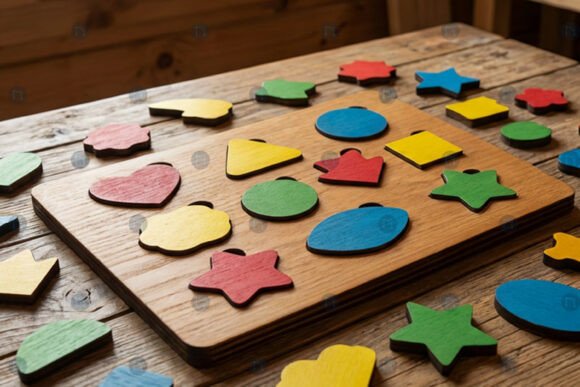
Laser Cut Shape Sorting Puzzle SVG: A Practical Guide for Makers
The Laser Cut Shape Sorting Puzzle SVG has become a staple for creators looking to blend educational value with modern aesthetics. When you see a realistic 3D mockup of these designs, the clean lines and perfect fit are immediately apparent. However, the journey from a digital file to a physical object is where many makers encounter friction. The difference between a frustrating project and a polished product often lies in how you approach the file preparation, material selection, and machine settings before you even hit "cut."
Whether you are a parent seeking a Montessori-inspired toy, an entrepreneur launching a small décor business, or a hobbyist exploring CNC crafts, understanding the nuances of this specific design type is crucial. This guide cuts through the marketing fluff to help you avoid common pitfalls that lead to wasted materials, poor tolerances, and unsatisfactory results.
Understanding the File Structure and Compatibility
Before downloading any shape sorting puzzle design, it is vital to understand what you are actually buying. A high-quality Laser Cut Shape Sorting Puzzle SVG is not just a single image; it is a vector-based blueprint designed for precision. These files typically come in multiple formats, including AI, EPS, SVG, DXF, and PNG. While having all these formats seems convenient, relying on the wrong one can cause significant issues.
A frequent mistake beginners make is attempting to cut directly from a PNG file. Because PNGs are raster images (made of pixels), they lack the mathematical paths required by laser cutters, Cricut machines, or Glowforge devices. If your software cannot trace a perfect vector path, the resulting cut will be jagged, and the pieces will not fit together tightly. Always ensure you are working with the SVG, DXF, or AI versions for cutting tasks. Use the PNG only for visualization or print-and-cut projects where extreme precision isn't the primary goal.
Furthermore, compatibility extends beyond just the file extension. Not all design software handles layers and nesting equally well. If you are using a Cricut Maker, the SVG format is generally the most reliable. For industrial-grade laser engravers or Glowforge, the DXF or AI formats often provide better control over line weights and node density. Checking your software's import capabilities before purchasing ensures you won't waste time trying to convert incompatible files later.
The Critical Role of Tolerances and Fit
The most overlooked detail in creating a shape sorting puzzle is the concept of tolerance. In a 3D mockup, the shapes appear to slide perfectly into their corresponding holes. In reality, wood expands, acrylic warps, and laser kerf (the width of the material removed by the beam) varies based on power and speed settings.
If you download a Laser Cut Shape Sorting Puzzle design without adjusting for your specific material thickness, you risk two outcomes: pieces that are too loose and fall out easily, or pieces that are so tight they require forceful insertion, potentially cracking the material. This is a common error among those who treat every design as "one size fits all."
To avoid this, you must customize the file. Look for the gap settings in your design software. For a standard 3mm plywood base, a gap of roughly 0.15mm to 0.2mm is often ideal, but this depends entirely on your machine's calibration. If you are making layered paper crafts, the tolerance needs to be significantly smaller than for hardwood. Always run a test cut on scrap material first. This simple step saves hours of frustration and prevents ruining expensive stock. Remember, a well-fitted puzzle feels satisfying to use, while a poorly fitted one feels cheap and breaks easily.
Material Selection Matters
Another area where decisions impact the final quality is material choice. While the design works for various substrates, not all materials are suitable for every application. For example, using MDF for a children's toy might seem cost-effective, but MDF contains glues and resins that can emit harmful fumes when laser cut and may not be safe for young children to mouth or handle extensively.
Birch plywood is often the superior choice for durability and safety, offering a clean edge finish that requires minimal sanding. Acrylic provides a sleek, modern look for home décor projects but requires different cutting speeds and higher temperatures. If you choose the wrong material for your intended audience—say, using thin basswood for a heavy-duty adult desk organizer—the structural integrity will fail under daily use. Evaluate the end-user and the environment before selecting your substrate.
Optimizing for Production and Customization
For entrepreneurs and small business owners, efficiency is key. One of the greatest advantages of a Laser Cut Shape Sorting Puzzle SVG is its customizability. You can adjust dimensions, add names, or change color schemes without starting from scratch. However, a common misunderstanding is assuming that complex customization automatically increases production time linearly.
Inefficient nesting can double your material waste and cut time. If you place puzzle pieces randomly on your cutting mat, you leave gaps that go unused. Instead, use nesting software or manually arrange the shapes to maximize the sheet usage. This is particularly important when working with expensive materials like maple or acrylic. By optimizing the layout, you reduce costs per unit and increase your profit margin.
Additionally, consider the complexity of the shapes. While intricate designs look stunning in a mockup, they introduce more nodes and curves, which slows down the cutting process and increases the chance of burning if the machine lingers too long on a curve. Simplifying unnecessary details can improve cut quality and speed without sacrificing the visual appeal. Balance aesthetic desires with mechanical realities.
Evaluating Quality Before Purchase
When browsing marketplaces for these files, it is easy to get distracted by flashy thumbnails. To ensure you are getting a professional-grade asset, dig deeper into the listing details. Check if the seller provides a preview of the actual vector nodes. A low-quality file might have thousands of unnecessary points, causing your machine to stutter or produce rough edges.
Look for reviews that mention the "fit" and "ease of editing." If other users report that the holes were too small or the lines were broken upon import, proceed with caution. A reputable seller will often include a readme file with recommended settings for popular machines like Glowforge or xTool. This indicates experience and a commitment to customer success.
Finally, verify the license terms. If you plan to sell the finished puzzles, ensure the license allows for commercial use. Some free or budget files restrict sales to a certain number of units, which can trap growing businesses. Investing in a properly licensed, high-resolution Laser Cut Shape Sorting Puzzle SVG protects your business and ensures you have the support needed to scale your production.
By paying attention to file formats, tolerances, material properties, and licensing, you transform a simple digital download into a high-quality, functional product. Whether you are crafting a gift for a child or building a brand around wooden toys, these practical steps will save you time, money, and disappointment.