Evaluating the Smartwatch Mockup for Professional Design Presentation
In the realm of digital product design, the ability to present concepts realistically is often just as critical as the design itself. A Smartwatch Mockup serves as a vital tool for designers, allowing them to visualize their interface creations within a realistic 3D display context. This resource is not merely a template; it is a structured environment designed to showcase designs professionally. By understanding the capabilities, limitations, and specific use cases of this asset, designers can make informed decisions about whether it aligns with their workflow and project requirements.
Understanding the Function of a Smartwatch Mockup
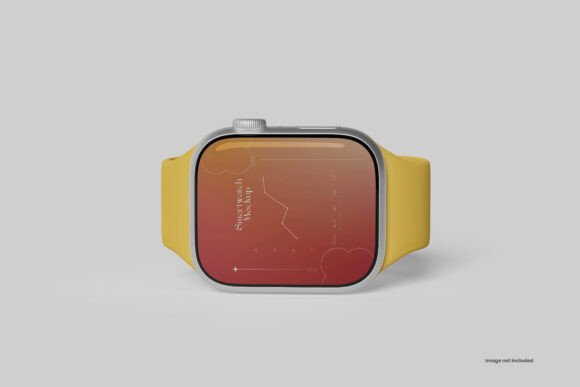
A Smartwatch Mockup is a digital file, typically in PSD (Photoshop Document) format, that simulates the appearance of a wearable device. Its primary function is to place a flat graphic design onto a rendered image of a watch face, complete with lighting effects, reflections, and shadows. The specific item described here leverages smart-object features, which are essential for non-destructive editing. This means the original design layers remain intact while the user replaces the placeholder content with their own artwork.
The technical specifications provided—such as a resolution of 4500×3000 pixels and a 300 DPI setting—indicate that this mockup is built for high-fidelity output. These metrics ensure that when the final presentation is viewed on high-resolution screens or printed for client meetings, the details remain sharp and clear. The inclusion of organized layers and folders suggests a focus on usability, reducing the time a designer spends navigating complex file structures.
Reasons to Consider This Asset
Designers might be interested in acquiring this specific Smartwatch Mockup for several practical reasons. First, the speed of iteration is a significant factor. In professional environments, clients often require multiple variations of a design to be presented quickly. The smart object feature allows for the replacement of current designs with new ones within seconds, streamlining the review process.
Second, the ability to adjust environmental factors adds versatility. Features such as adjustable light, changeable background color, and changeable shadow color allow the designer to tailor the mood of the presentation. For instance, a dark mode interface might look best against a moody, low-light background, while a vibrant health app interface might benefit from a bright, clean backdrop. Having these controls within a single file eliminates the need to switch between different software tools to achieve the desired aesthetic.
Benefits and Workflow Integration
The primary benefit of using a high-quality Smartwatch Mockup is the enhancement of perceived value. A flat screenshot of an interface can appear abstract and difficult to contextualize. Placing that same design into a realistic 3D display helps stakeholders understand how the UI elements will interact with physical hardware constraints, such as screen curvature or bezel size.
The technical organization of the file further supports efficiency. With 5 PSD files included, a designer gains access to various angles or styles without needing to purchase separate assets. The accompanying PDF guide ensures that even those less familiar with advanced Photoshop techniques can navigate the smart objects effectively. The high resolution ensures that the asset is future-proof, suitable for large-format presentations or detailed zoom-ins during critique sessions.
Tradeoffs and Considerations
While the advantages are clear, there are tradeoffs to consider before integrating this tool into a workflow. The most significant constraint is the dependency on Adobe Photoshop. Since the files are provided in PSD format with smart object functionality, users who rely solely on alternative software like Figma, Sketch, or Canva cannot utilize the dynamic features directly. They would need to convert the files or work around the smart object limitations, which may negate the time-saving benefits.
Additionally, the realism of the mockup is bound by the static nature of the base image. While the lighting and background can be adjusted, the physical properties of the watch—such as the material texture or the exact shape of the casing—are fixed. If a project requires showing off a custom hardware design rather than just a software interface, this standard mockup may not suffice. It is designed to showcase screen content, not to model the device itself.
Situations Where This Mockup is a Strong Fit
This Smartwatch Mockup is an ideal choice for UI/UX designers preparing portfolios or pitch decks. When presenting a new fitness application or a smart home control interface, the ability to show the design on a recognizable device form factor bridges the gap between concept and reality. It is particularly effective for agencies that need to turn around multiple design options rapidly for client approval.
It is also well-suited for marketing materials where high-resolution imagery is required. The 300 DPI and 4500×3000px dimensions make it viable for print advertisements, brochures, or high-quality social media graphics. The flexibility to change the background color allows marketers to maintain brand consistency across different campaigns without needing to create custom renders from scratch.
When Alternatives May Be Worth Considering
Despite its strengths, there are scenarios where alternatives should be considered. If the design team operates entirely within a cloud-based collaborative environment like Figma, importing a heavy PSD file with smart objects can disrupt the workflow. In such cases, native Figma plugins or web-based mockup generators might offer a more seamless experience, even if they lack the granular control over shadows and lighting found in this Photoshop asset.
Furthermore, if the project involves complex animations or interactive prototypes, a static image mockup is insufficient. For demonstrating how a watch face transitions between screens or reacts to touch gestures, video mockups or interactive prototyping tools are necessary. This asset excels at static presentation but does not support motion or interactivity.
Practical Decision-Making Insights
To determine if this Smartwatch Mockup aligns with your goals, evaluate your current software stack and presentation needs. If you already use Adobe Photoshop and require high-resolution, customizable static images for client deliverables, this asset offers a strong return on investment through time savings and visual quality. The organized layers and adjustment capabilities reduce the friction of creating polished visuals.
However, if your workflow prioritizes real-time collaboration, animation, or if you do not have access to Photoshop, the learning curve and conversion efforts may outweigh the benefits. In those instances, exploring native tools or animated rendering services might be more efficient. Ultimately, the decision rests on balancing the need for photorealistic static presentation against the constraints of your existing design ecosystem.