Table Tent Mockup: A Professional Preview Tool
In the competitive landscape of graphic design and marketing, the ability to present a concept before it is physically produced can be the deciding factor in securing a client or launching a successful campaign. This is where a high-quality Table Tent Mockup becomes an essential asset in a designer's toolkit. Unlike flat digital proofs that often fail to convey texture, lighting, and context, a realistic 3D display allows stakeholders to visualize the final product with accuracy. The specific resource described here offers a streamlined workflow for professionals who need to showcase their designs quickly without sacrificing visual fidelity.
The core value of this particular Table Tent Mockup lies in its balance between technical sophistication and user accessibility. It is designed not just as a static image, but as a dynamic template within Adobe Photoshop. By utilizing smart-object features, it bridges the gap between complex 3D rendering software and standard 2D design workflows. For freelancers, agencies, and small business owners, this efficiency translates directly into saved time and reduced friction during the presentation phase of a project.
Understanding the Utility of Table Tent Displays
Before diving into the technical specifications, it is important to understand the practical role of table tents in modern communication. Often referred to as "tent cards," these folded paper displays are ubiquitous in restaurants, conferences, hotels, and retail environments. They serve functional purposes such as displaying menus, pricing lists, event schedules, or promotional offers. Because they sit at eye level on a table, they require legible typography and compelling imagery to capture attention effectively.
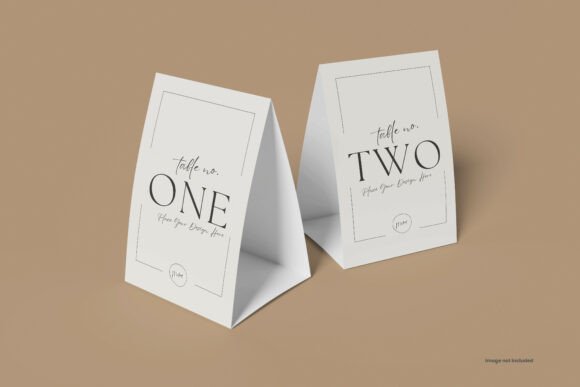
When a designer creates a layout for a table tent, the flat file rarely tells the whole story. How does the fold look? Is the bleed sufficient? Does the color profile hold up under different lighting conditions? A Table Tent Mockup answers these questions by placing the design into a simulated physical environment. It provides a realistic context that helps clients make informed decisions about fonts, contrast, and overall aesthetic direction before any printing costs are incurred.
Technical Specifications and Workflow Efficiency
The effectiveness of a mockup is heavily dependent on its resolution and file structure. This specific tool delivers a high-resolution output of 4500×3000 pixels at 300 DPI. These dimensions are critical for professional use. At 300 DPI, the image retains sharpness when viewed on high-density screens or when printed for large-format presentations. Many lower-quality mockups suffer from pixelation when zoomed in, which undermines the professional impression a designer is trying to create. The 4500×3000px canvas ensures that fine details, such as small text on a menu card, remain crisp and readable.
A significant advantage of this resource is its reliance on smart object features. In the context of Adobe Photoshop, smart objects allow users to embed vector data or raster images that can be edited non-destructively. To update the design, a user simply double-clicks the designated layer thumbnail, pastes their artwork into the opened document, saves, and returns to the main file. The new design automatically warps, shadows, and adjusts to fit the perspective of the table tent. This process, which might take minutes in a manual workflow, happens within seconds here.
Furthermore, the file organization plays a crucial role in usability. With organized layers and folders, designers can navigate the complex structure of the PSD file without confusion. Whether adjusting the lighting effects, changing the background, or tweaking the shadow intensity, the logical grouping of elements prevents the frustration often associated with poorly constructed templates. The inclusion of adjustment light layers adds another layer of control, allowing the user to fine-tune the brightness and mood of the scene to match their brand identity.
Customization and Visual Flexibility
One of the most challenging aspects of using stock mockups is making them feel unique to a specific brand. Generic backgrounds can distract from the design being showcased. This Table Tent Mockup addresses this by offering changeable background colors and shadow colors. This flexibility is particularly valuable for brands with strict style guides. If a company requires all their collateral to appear against a specific hex code or a soft gradient, this tool accommodates those requirements without needing advanced photo manipulation skills.
The ability to modify shadow color is a subtle yet powerful feature. Shadows are not always black; they reflect the ambient light of the environment. By adjusting the shadow hue, a designer can ensure the table tent looks like it belongs in a warm restaurant setting or a sterile corporate conference room. This attention to detail elevates the realism of the presentation, making the client feel more confident in the proposed design.
The package includes five distinct PSD files, providing variety in angles or setups. While the description notes that images and photographs are for presentation purposes only, the versatility of having multiple files allows a designer to choose the angle that best highlights their specific work. For instance, one file might focus on the front face of the tent, while another captures the fold and the back, ensuring comprehensive coverage of the design.
Real-World Application and Audience Fit
Who benefits most from this tool? The primary audience includes graphic designers, marketing professionals, and entrepreneurs who manage their own branding. For a freelancer pitching to a restaurant owner, showing a photorealistic render of the menu on a table tent is far more persuasive than sending a PDF proof. It demonstrates professionalism and attention to detail.
Small business owners also find immense value in this resource. Without access to a full-time design team, they can use the included PDF guide to learn how to insert their logos and promotional text into the template. This empowers them to create high-quality visuals for social media posts, websites, or investor decks. Educators and publishers may similarly utilize these assets to demonstrate print concepts to students or readers, bridging the gap between digital creation and physical reality.
However, it is important to acknowledge limitations. While the smart object feature is efficient, it assumes a certain level of familiarity with Adobe Photoshop. Users who rely solely on web-based design tools or other software ecosystems will not be able to utilize the PSD format. Additionally, while the background color is changeable, the physical environment (the table surface, the lighting source) remains fixed within the parameters of the original photograph. For projects requiring a completely custom environment, a 3D modeling solution might still be necessary.
Evaluating Long-Term Value and Reliability
From a cost-benefit perspective, investing in a well-structured Table Tent Mockup offers long-term value. The initial time investment to learn the workflow is minimal, especially with the provided PDF guide. Once mastered, the speed of production increases significantly. Instead of spending hours retouching photos or manually warping images, a designer can generate multiple variations of a proposal in the time it takes to brew a cup of coffee.
Reliability is another key factor. The high resolution and organized layer structure ensure that the files do not break easily when updated. There is no risk of losing quality upon export, and the non-destructive nature of smart objects means the original template remains intact for future use. This consistency builds trust with clients, as the presentation materials are always polished and error-free.
In conclusion, this Table Tent Mockup serves as a robust bridge between digital design and physical execution. Its combination of high resolution, smart-object technology, and customizable lighting makes it a practical choice for professionals seeking to elevate their presentations. While it requires a working knowledge of Photoshop, the efficiency gains and the enhanced realism it brings to client pitches make it a worthwhile addition to any creative asset library. For those looking to present their table tent designs with confidence and clarity, this tool provides the necessary foundation to succeed.