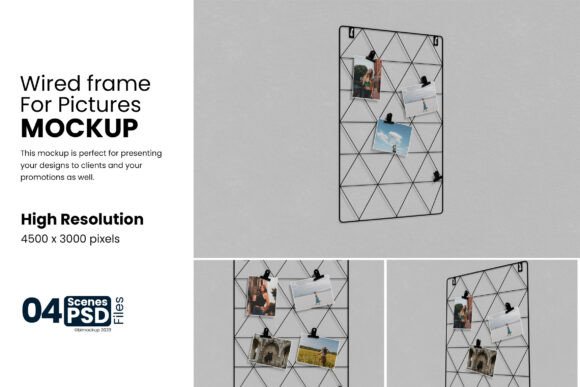
Wired Frame for Photos Mockup Guide
Presenting a design in a vacuum often fails to convey its true potential. A flat image on a white background tells only part of the story, leaving clients and viewers to imagine how that artwork might look in a real-world setting. This is where a high-quality presentation tool becomes essential. The Wired Frame for Photos Mockup offers a bridge between digital creation and physical reality, allowing designers to showcase their work within a realistic 3D display instantly. By simulating depth, lighting, and texture, this resource transforms static graphics into tangible concepts that resonate more deeply with an audience.
Understanding the Wired Frame Concept
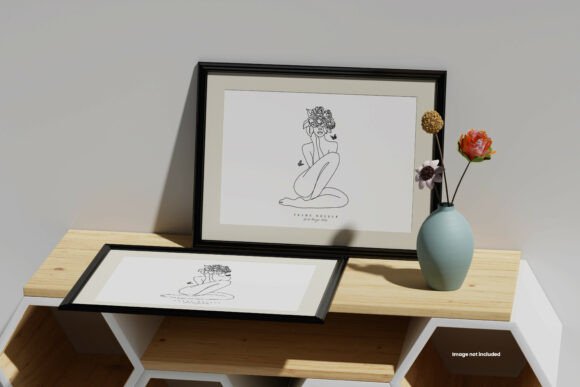
The Wired Frame for Photos Mockup is not merely a template; it is a sophisticated visualization tool designed for Adobe Photoshop. At its core, it provides a photorealistic environment where your digital designs can be placed inside a framed structure. The "wired" aesthetic suggests a modern, perhaps industrial or minimalist style, characterized by clean lines and a focus on the content itself. Unlike standard templates that might feel generic, this mockup is built with specific attention to detail, offering a resolution of 4500×3000px at 300 DPI. This ensures that whether the final output is viewed on a high-density screen or printed for a portfolio, the clarity remains uncompromised.
The technical foundation relies heavily on smart-object features. In the world of graphic design, smart objects are layers that preserve the source content's original characteristics. When you double-click the designated layer in the PSD file, a new window opens containing your placeholder image. You simply paste your own artwork, save the file, and return to the main document. The software automatically updates the frame, applying perspective, shadows, and lighting effects seamlessly. This process eliminates the need for complex masking or manual distortion, saving hours of laborious work.
Why Different Audiences Value Realistic Displays
The utility of a mockup extends far beyond professional graphic designers. Its value shifts depending on who is using it and what they aim to achieve. For a freelance illustrator, the primary concern is often client perception. A client may struggle to visualize how a logo will look on a wall or how a photograph fits within a home decor setting. By presenting the design in a realistic context, the freelancer reduces ambiguity and increases the likelihood of approval. The ability to change the background color or shadow intensity allows the creator to match the mockup to the client's existing brand palette or interior design preferences, adding a layer of customization that builds trust.
For small business owners and entrepreneurs, time is a critical currency. They often need to produce marketing materials quickly without hiring an external agency. The Wired Frame for Photos Mockup serves as a cost-effective solution for generating professional-grade product shots. Instead of spending money on photography equipment or studio rentals, they can use this digital asset to create compelling social media posts, website banners, or catalog images. The organized layers and folders mean that even someone with moderate Photoshop skills can navigate the file without getting lost, making the transition from concept to finished asset incredibly smooth.
Educators and hobbyists also find significant value in these tools. In an academic setting, students learning about composition and layout benefit from seeing their work in a simulated environment. It teaches them to consider scale, framing, and environmental context—skills that are vital for professional growth. Similarly, hobbyists who enjoy creating art for personal projects or online communities can elevate their presentations. Sharing a piece of art inside a well-rendered frame commands more respect and engagement than sharing a raw file, helping creators build a stronger online presence.
Technical Flexibility and Customization
One of the defining features of this mockup package is its flexibility. The inclusion of adjustment layers for light and shadow gives users control over the mood of the presentation. Perhaps a design needs to appear in a bright, airy gallery space, or maybe it requires a dramatic, moody atmosphere. With the adjustable settings, users can tweak the lighting to suit the narrative they wish to tell. Furthermore, the ability to change the background color ensures that the mockup can adapt to various branding requirements. If a company uses a specific shade of blue for its identity, the background can be shifted to complement that tone, ensuring visual consistency across all marketing materials.
The package includes five distinct PSD files, providing variety without overwhelming the user. Each file likely offers a different angle, framing style, or environmental setup, allowing creators to present the same design in multiple ways. This variety is crucial for A/B testing in marketing campaigns or for showcasing a versatile portfolio. Additionally, the inclusion of a PDF guide ensures that users are not left guessing. Clear instructions demystify the process, explaining exactly which layers to modify and how to utilize the smart object features effectively. This documentation supports beginners who might be intimidated by complex Photoshop interfaces, lowering the barrier to entry.
Evaluating Suitability for Your Projects
Determining if the Wired Frame for Photos Mockup aligns with your goals requires an honest assessment of your current workflow and project needs. If you are a professional seeking to streamline your client presentations, the speed offered by smart objects is a major advantage. The promise of replacing designs within seconds translates directly to increased productivity. You can iterate through multiple concepts rapidly, showing clients options rather than forcing them to choose from a single static image.
However, if your work involves highly specialized textures or unique physical materials that do not match the "wired" aesthetic, this specific mockup might not be the perfect fit. It is important to review the sample images carefully. Remember that the photographs included in the preview are for presentation purposes only and are not part of the download. You will be working with the empty frame structure. If your project demands a rustic wooden frame or a vintage ornate style, this modern wired design may not serve your creative vision.
For those prioritizing long-term usefulness, the high resolution and organized file structure make this a valuable asset for a growing library of resources. As your skills improve, you may find yourself returning to these files to experiment with advanced lighting techniques or to combine them with other assets. The 300 DPI standard ensures that the files remain relevant even as print and display technologies evolve, protecting your investment in the design resource.
Practical Application Scenarios
Consider a blogger who writes about interior design trends. They could use the Wired Frame for Photos Mockup to illustrate how different art styles influence room aesthetics. By swapping out the central image, they can demonstrate the impact of abstract versus realistic art in a modern living space. Or think of a photographer selling prints online. Instead of just showing the digital file, they can display the photo in the mockup to help customers visualize the size and finish of the final product on their walls. These practical applications highlight how a simple tool can enhance storytelling and drive sales.
Ultimately, the decision to use this mockup comes down to the balance between quality, ease of use, and relevance. It offers a professional edge for those willing to leverage its features, providing a polished look that elevates any design portfolio. Whether you are a seasoned marketer refining a campaign or a beginner taking your first steps into professional design, the ability to present work realistically is a skill that pays dividends. With its robust features and user-friendly structure, the Wired Frame for Photos Mockup stands as a reliable companion for anyone looking to bring their digital creations to life.